- Версия Unreal Engine
- 5.6
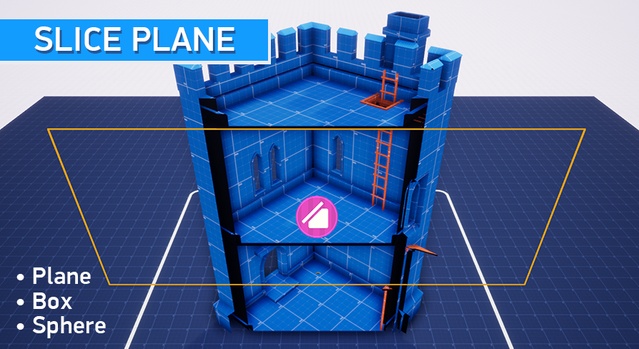
This asset allows you to hide specific parts of any mesh, and has 3 types of shape-based mesh concealment: planar, box and spherical. Works both in the editor and during runtime.
Update v1.1 for UE 5.6+
- Added glow effect along the cut line.
- To add the effect, you need to use 3 new functions: MF_SlicePlaneGlow, MF_SliceSphereGlow and MF_SliceSphere.
- Added Overview_Glow level with an example of glow usage.
For this asset to work, you will need to add one of the 3 functions included in this asset to your materials, then any mesh, to which those materials are applied, will be hidden by the Slicer.
Each type of Slicer requires its own Material Function.
(See Documentation for additional information).
Slicer does not cut the geometry or collision of the mesh, only hides a part of it.
Only one slicer can be used on a level at the same time.
Features:
3 types of mesh concealment:
Planar - hides everything that’s located on one of its sides
Box - hides everything inside, can be rotated and scaled, can also be inverted to hide everything outside of it.
Spherical - hides everything inside, can be scaled and inverted
- Works both in the editor and during runtime
- Hidden meshes can cast shadows
- Hidden meshes can be rotated
- Hidden area can be inverted
- Works with decals
- Bonus: a simple top-down camera and border blueprints are also included
Technical details
Completely made in blueprintsContains:
- 1 Main Slicer Blueprint
- 6 Material Functions
- 6 Demo Blueprints and Widgets
- 11 Demo Materials and Material instances
- 2 Textures
- 1 Mesh
- Overview levels